
解决软件总是提示权限不足或者非要用管理员权限打开
2025-03-30
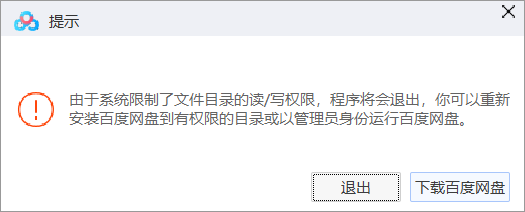
今天用百度网盘,因为路径不在C盘的问题,百度网盘没权限,然后出现一堆bug,这样的软件不仅仅是百度网盘,很多软件都这样,每次都去找到exe再运行我又会觉得很烦,思来想去,就做了这样一个软件,利用powershell命令来实现调用UAC权限打开软件的脚本
原理就是如下命令,将路径换成其他exe就好了
powershell -Command "Start-Process 'D:\Program Files (x86)\BaiduNetdisk\BaiduNetdisk.exe' -Verb runAs"
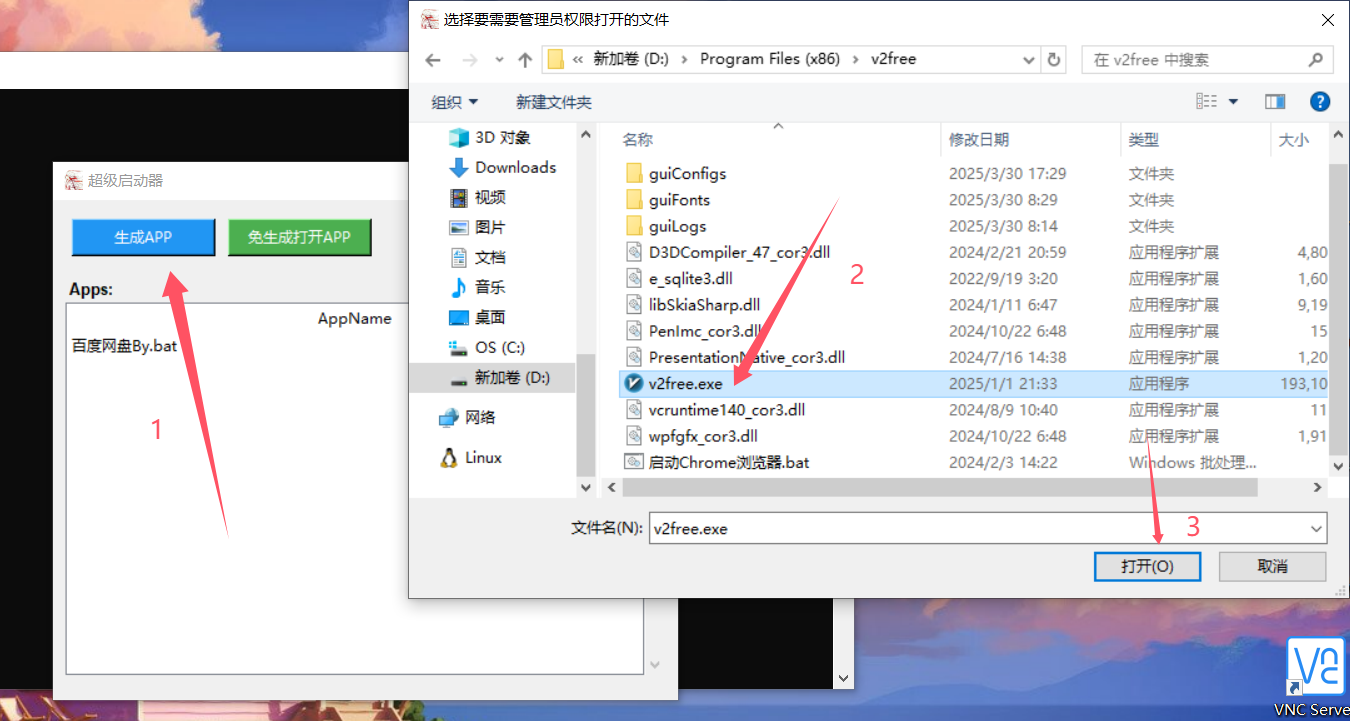
运行程序(代码后面会发是python文件),选择生成APP,找到要启动的程序exe文件,点击打开
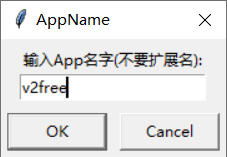
然后输入名字,推荐和软件名字,但是千万别输入任何后缀
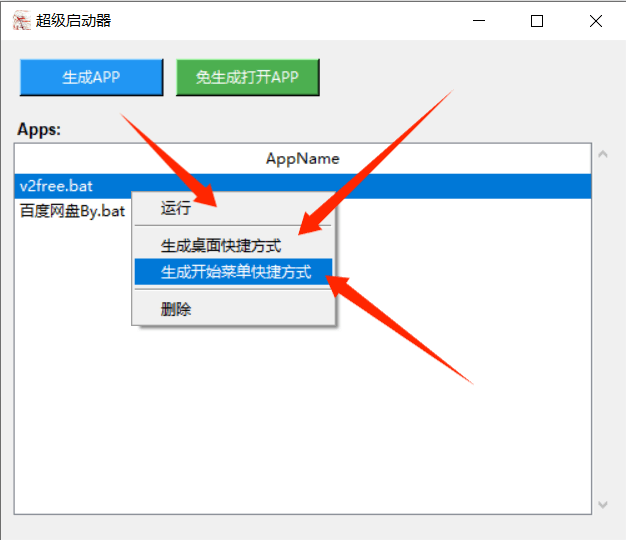
然后在list里面就会有这个APP,右键就可以直接以管理员的方式运行,或者发送快捷方式到桌面或者发送到开始菜单
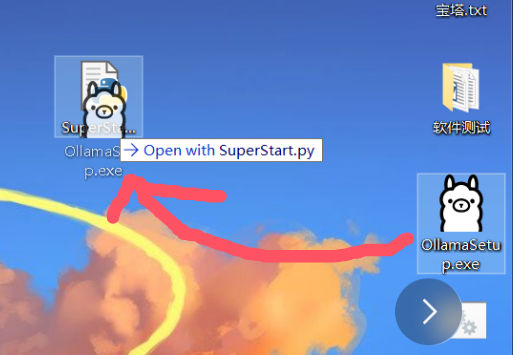
当然了,你也可以把这个软件放到桌面上,然后拖到任何程序到这个软件图标上就可以直接以管理员权限打开,非常方便
Code:
import subprocess
import tkinter as tk
from tkinter import filedialog, simpledialog, messagebox, ttk
import os
import argparse
import winshell

def parse_arguments():
    parser = argparse.ArgumentParser(description='超级启动器')
    parser.add_argument('file', nargs='?', help='要拖放的文件路径')
    return parser.parse_args()

def handle_filepath(filepath):
    if "/" in filepath:
        filepath = filepath.replace("/", "\\")
    return filepath

def cmd_filepath(filepath):
    filepath = handle_filepath(filepath)
    command = f'powershell -Command "Start-Process \'{filepath}\' -Verb runAs"'
    return command

def run_command(command):
    subprocess.run(command, shell=True, capture_output=True, text=True)

def load_config():
    if not os.path.exists('config.info'):
        with open('config.info', 'w') as f:
            f.write('path="apps"')
            os.makedirs("apps", exist_ok=True)
            return "apps"
    else:
        with open('config.info', 'r') as f:
            config_info = f.read()
            path = config_info.split('=')[1].strip().replace('"', '')
            return path

def get_app_list():
    apps_dir = load_config()
    if not os.path.exists(apps_dir):
        return []

    app_files = [f for f in os.listdir(apps_dir) if f.endswith('.bat')]
    return app_files

def create_main_window():
    root = tk.Tk()
    root.title("超级启动器")
    root.geometry("500x400")

    try:
        root.iconbitmap('icon.ico')
    except:
        pass

    return root

def open_app():
    file_path = filedialog.askopenfilename(title="选择要打开的应用程序")
    if not file_path:
        return

    command = cmd_filepath(file_path)
    run_command(command)

def generate_app():
    savepath = load_config()

    file_path = filedialog.askopenfilename(title="选择要需要管理员权限打开的文件")
    if not file_path:
        return

    filename = simpledialog.askstring("AppName", "输入App名字(不要扩展名):")
    if not filename:
        return

    command = cmd_filepath(file_path)
    bat_filename = os.path.join(savepath, filename + ".bat")
    bat_filename = handle_filepath(bat_filename)

    try:
        with open(bat_filename, "w") as f:
            f.write(command)
        messagebox.showinfo("成功", f"App已保存到:\n{bat_filename}")
        refresh_app_list()
    except Exception as e:
        messagebox.showerror("错误", f"保存文件失败:\n{str(e)}")

def run_selected_app(event=None):
    selected_item = app_listbox.selection()
    if not selected_item:
        messagebox.showwarning("警告", "请先选择一个APP")
        return

    item_text = app_listbox.item(selected_item)['values'][0]
    apps_dir = load_config()
    app_path = os.path.join(apps_dir, item_text)

    try:
        subprocess.run(app_path, shell=True)
    except Exception as e:
        messagebox.showerror("错误", f"运行APP失败:\n{str(e)}")

def delete_selected_app(event=None):
    selected_item = app_listbox.selection()
    if not selected_item:
        messagebox.showwarning("警告", "请先选择一个APP")
        return

    item_text = app_listbox.item(selected_item)['values'][0]
    apps_dir = load_config()
    app_path = os.path.join(apps_dir, item_text)

    try:
        os.remove(app_path)
        refresh_app_list()
        messagebox.showinfo("成功", f"已删除: {item_text}")
    except Exception as e:
        messagebox.showerror("错误", f"删除APP失败:\n{str(e)}")

def create_lnk_shortcut(event=None, target_folder="desktop"):
    selected_item = app_listbox.selection()
    if not selected_item:
        messagebox.showwarning("警告", "请先选择一个APP")
        return

    item_text = app_listbox.item(selected_item)['values'][0]
    apps_dir = os.path.abspath(load_config())
    bat_path = os.path.join(apps_dir, item_text)

    try:
        with open(bat_path, 'r') as f:
            bat_content = f.read()

        import re
        match = re.search(r"Start-Process \'(.*?)\'", bat_content)
        if not match:
            messagebox.showerror("错误", "无法解析.bat文件中的目标程序路径")
            return

        exe_path = match.group(1)
        exe_path = handle_filepath(exe_path)

        if not os.path.exists(exe_path):
            messagebox.showerror("错误", f"目标程序不存在:\n{exe_path}")
            return
    except Exception as e:
        messagebox.showerror("错误", f"解析.bat文件失败:\n{str(e)}")
        return

    if target_folder == "desktop":
        lnk_folder = winshell.desktop()
    elif target_folder == "start_menu":
        lnk_folder = os.path.join(os.getenv('APPDATA'), 'Microsoft', 'Windows', 'Start Menu', 'Programs')

    lnk_name = item_text[:-4] + ".lnk"
    lnk_path = os.path.join(lnk_folder, lnk_name)

    try:
        with winshell.shortcut(lnk_path) as shortcut:
            shortcut.path = os.path.abspath(bat_path)
            shortcut.description = "快捷方式到 " + item_text
            shortcut.working_directory = os.path.abspath(apps_dir)
            shortcut.runas = 1
            shortcut.icon_location = (exe_path, 0)

        location = "桌面" if target_folder == "desktop" else "开始菜单"
        messagebox.showinfo("成功", f"已创建快捷方式到{location}:\n{lnk_name}")
    except Exception as e:
        messagebox.showerror("错误", f"创建快捷方式失败:\n{str(e)}")

def create_start_menu_shortcut():
    create_lnk_shortcut(target_folder="start_menu")

def show_context_menu(event):
    item = app_listbox.identify_row(event.y)
    if item:
        app_listbox.selection_set(item)

        menu = tk.Menu(root, tearoff=0)
        menu.add_command(label="运行", command=run_selected_app)
        menu.add_separator()
        menu.add_command(label="生成桌面快捷方式", command=lambda: create_lnk_shortcut(target_folder="desktop"))
        menu.add_command(label="生成开始菜单快捷方式", command=create_start_menu_shortcut)
        menu.add_separator()
        menu.add_command(label="删除", command=delete_selected_app)

        try:
            menu.tk_popup(event.x_root, event.y_root)
        finally:
            menu.grab_release()

def refresh_app_list():
    for item in app_listbox.get_children():
        app_listbox.delete(item)

    app_files = get_app_list()
    for i, app in enumerate(app_files, 1):
        app_listbox.insert("", "end", values=(app,), tags=(f'row{i}',))

def main():
    global app_listbox, root

    root = create_main_window()

    main_frame = tk.Frame(root)

    main_frame.pack(fill=tk.BOTH, expand=True, padx=10, pady=10)


    button_frame = tk.Frame(main_frame)
    button_frame.pack(fill=tk.X, pady=5)

    generate_button = tk.Button(
        button_frame,
        text="生成APP",
        command=generate_app,
        width=15,
        height=1,
        bg="#2196F3",
        fg="white"
    )
    generate_button.pack(side=tk.LEFT, padx=5)

    open_button = tk.Button(
        button_frame,
        text="免生成打开APP",
        command=open_app,
        width=15,
        height=1,
        bg="#4CAF50",
        fg="white"
    )
    open_button.pack(side=tk.LEFT, padx=5)

    list_frame = tk.Frame(main_frame)
    list_frame.pack(fill=tk.BOTH, expand=True, pady=10)

    list_label = tk.Label(list_frame, text="Apps:", font=("Arial", 10, "bold"))
    list_label.pack(anchor=tk.W)

    app_listbox = ttk.Treeview(list_frame, columns=("app",), show="headings", height=10)
    app_listbox.heading("app", text="AppName")
    app_listbox.column("app", width=450, anchor=tk.W)

    scrollbar = ttk.Scrollbar(list_frame, orient="vertical", command=app_listbox.yview)
    app_listbox.configure(yscrollcommand=scrollbar.set)
    scrollbar.pack(side=tk.RIGHT, fill=tk.Y)
    app_listbox.pack(fill=tk.BOTH, expand=True)

    app_listbox.bind("<Button-3>", show_context_menu)

    app_listbox.bind("<Double-1>", run_selected_app)

    refresh_app_list()

    root.mainloop()

if __name__ == "__main__":
    args = parse_arguments()
    if args.file:  # 如果有拖放的文件
        command = cmd_filepath(args.file)
        run_command(command)
    else:  # 正常启动GUI
        main()
发表评论: