
Dot拓点 文本设置网页版
2026-01-10
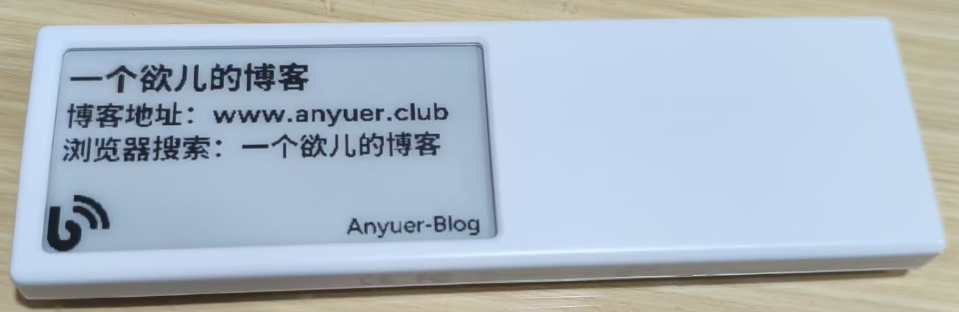
朋友送了一个Dot拓点摆件玩具,官网如下
https://dot.mindreset.tech/app
首先需要获取API-key,参考官方文档
https://dot.mindreset.tech/docs/service/open/get_api
然后再获取设备序列号,同样参考官方文档
https://dot.mindreset.tech/docs/service/open/get_device_id
然后就是在手机上添加 文本API 这个内容
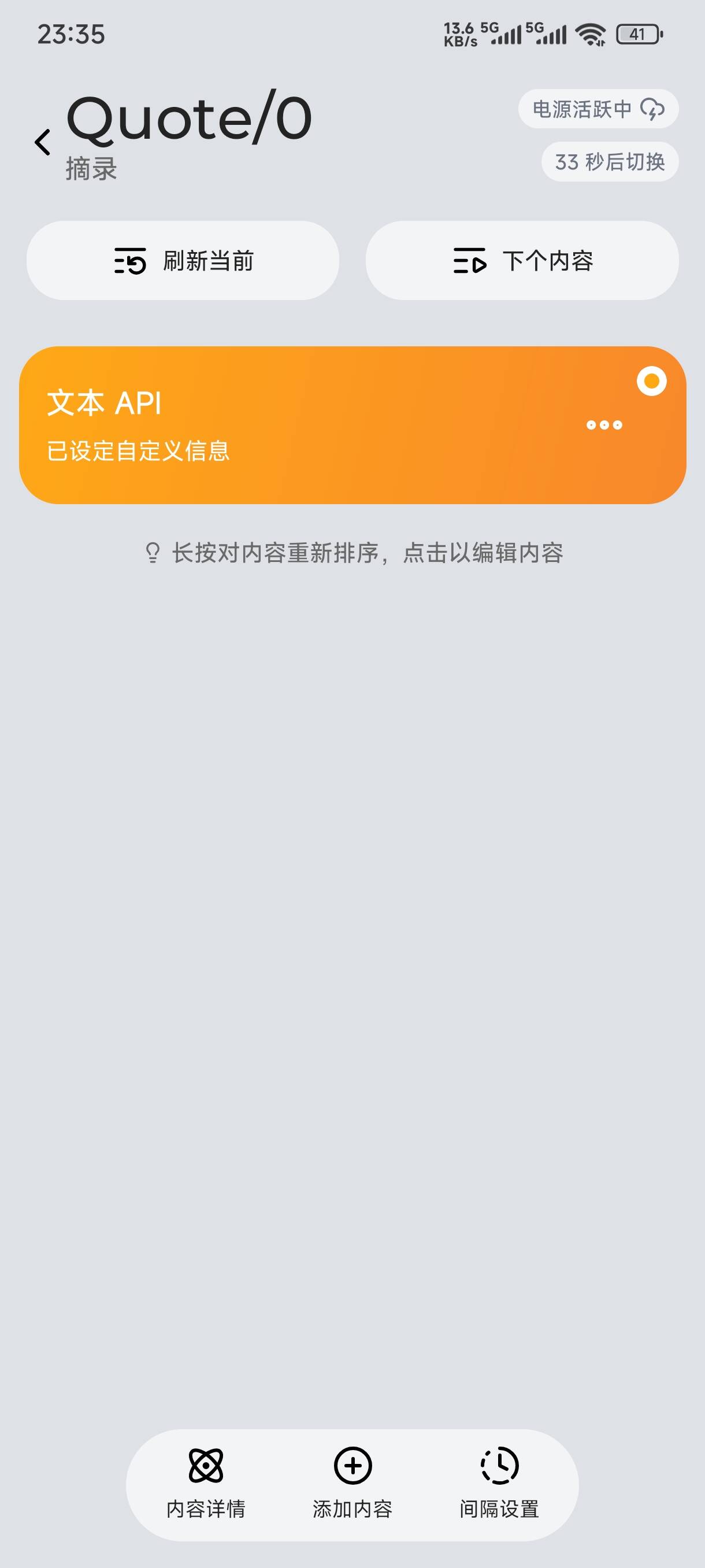
然后访问网址,输入信息,点击发送即可生效!
http://www.anyuer.club/dot/text/
当热咯!开源精神!!!
<!DOCTYPE html>
<html>
<head>
    <meta charset="UTF-8" />
    <title>Text API Sender</title>

    <style>
        :root {
            --bg: #f4f6fb;
            --card: #ffffff;
            --primary: #2563eb;
            --primary-hover: #1d4ed8;
            --success: #16a34a;
            --text: #1f2937;
            --muted: #6b7280;
            --border: #e5e7eb;
            --radius: 10px;
        }

        * {
            box-sizing: border-box;
        }

        body {
            margin: 0;
            padding: 32px 16px;
            background: var(--bg);
            font-family: system-ui, -apple-system, BlinkMacSystemFont, "Segoe UI";
            color: var(--text);
        }

        /* 主卡片 */
        .box {
            max-width: 760px;
            margin: auto;
            background: var(--card);
            padding: 28px 32px;
            border-radius: var(--radius);
            box-shadow: 0 10px 30px rgba(0,0,0,.08), 0 1px 3px rgba(0,0,0,.05);
        }

            /* 标题 */
            .box h2 {
                margin: 0 0 24px;
                font-size: 22px;
                display: flex;
                align-items: center;
                gap: 8px;
            }

                .box h2::before {
                    content: "📡";
                }

        /* label */
        label {
            display: block;
            margin-top: 16px;
            font-size: 14px;
            font-weight: 600;
        }

        /* 输入框 */
        input, textarea, select {
            width: 100%;
            margin-top: 6px;
            padding: 10px 12px;
            border-radius: 8px;
            border: 1px solid var(--border);
            font-size: 14px;
            background: #fff;
            transition: border-color .2s, box-shadow .2s;
        }

        textarea {
            resize: vertical;
            line-height: 1.5;
        }

            input:focus,
            textarea:focus,
            select:focus {
                outline: none;
                border-color: var(--primary);
                box-shadow: 0 0 0 3px rgba(37,99,235,.15);
            }

        /* hint */
        .hint {
            font-size: 12px;
            color: var(--muted);
            margin-top: 6px;
        }

        /* 按钮 */
        button {
            margin-top: 18px;
            padding: 11px 22px;
            font-size: 14px;
            font-weight: 600;
            border-radius: 8px;
            border: none;
            cursor: pointer;
            transition: background .2s, transform .05s, box-shadow .2s;
        }

            button:active {
                transform: translateY(1px);
            }

            button:disabled {
                opacity: .6;
                cursor: not-allowed;
            }

        /* 保存按钮 */
        .btn-save {
            background: var(--success);
            color: #fff;
        }

            .btn-save:hover {
                background: #15803d;
            }

        /* 发送按钮 */
        .btn-send {
            width: 100%;
            background: var(--primary);
            color: #fff;
            font-size: 15px;
        }

            .btn-send:hover {
                background: var(--primary-hover);
                box-shadow: 0 8px 18px rgba(37,99,235,.25);
            }

        /* 高级参数 */
        details {
            margin-top: 24px;
            padding: 16px;
            border: 1px dashed var(--border);
            border-radius: 8px;
            background: #fafafa;
        }

        summary {
            cursor: pointer;
            font-weight: 600;
            color: var(--primary);
        }

        /* 结果输出 */
        pre {
            margin-top: 22px;
            padding: 14px 16px;
            background: #0b1020;
            color: #22c55e;
            border-radius: 8px;
            font-size: 13px;
            line-height: 1.5;
            max-height: 300px;
            overflow: auto;
            display: none;
        }

        /* loading 遮罩 */
        .mask {
            position: fixed;
            inset: 0;
            background: rgba(15,23,42,.45);
            display: none;
            align-items: center;
            justify-content: center;
            z-index: 999;
            backdrop-filter: blur(4px);
        }

        .dialog {
            background: #fff;
            padding: 28px 36px;
            border-radius: 12px;
            box-shadow: 0 20px 40px rgba(0,0,0,.25);
            text-align: center;
            font-size: 15px;
        }

        /* loading 圆环 */
        .spinner {
            width: 40px;
            height: 40px;
            border: 4px solid #e5e7eb;
            border-top-color: var(--primary);
            border-radius: 50%;
            margin: 0 auto 14px;
            animation: spin 1s linear infinite;
        }

        @keyframes spin {
            to {
                transform: rotate(360deg);
            }
        }
    </style>
</head>

<body>

    <div>
        <h2>文本类发送需求</h2>

        <label>API_KEY *</label>
        <input id="apiKey" placeholder="Bearer Token" />

        <label>deviceId *</label>
        <input id="deviceId" placeholder="设备 ID" />

        <button onclick="saveAuth()">💾 保存 API_KEY & deviceId</button>
        <div>凭证仅保存在当前浏览器,本地使用</div>

        <label>title(标题)</label>
        <input id="title" placeholder="默认:通知" />

        <label>message(正文内容)</label>
        <textarea id="message" rows="5"></textarea>

        <details>
            <summary>⚙ 高级参数</summary>

            <label>refreshNow</label>
            <select id="refreshNow">
                <option value="" selected>不指定(由系统决定)</option>
                <option value="true">true 立即显示</option>
                <option value="false">false 非立即显示</option>
            </select>


            <label>signature</label>
            <input id="signature" placeholder="文本签名(显示在屏幕右下角的签名)" />

            <label>link</label>
            <input id="link" placeholder="http/https 链接或 Scheme Url(碰一碰跳转的内容)" />

            <label>icon(PNG 图标 40×40)</label>
            <input type="file" id="iconFile" accept="image/png" />

            <div>
                图标要求:PNG 格式,建议 40×40 像素,透明背景效果最佳。
                <br />
                👉 可在
                <a href="https://sc.chinaz.com/tubiao/"
                   target="_blank"
                   rel="noopener noreferrer"
                   style="color:#2563eb;font-weight:600;">
                    站长素材 · 图标库
                </a>
                下载合适的 PNG 图标
            </div>


            <img id="iconPreview"
                 style="margin-top:10px;width:40px;height:40px;display:none;border-radius:6px;border:1px solid #e5e7eb;" />

            <!-- 隐藏字段,真正发送用 -->
            <textarea id="icon" style="display:none;"></textarea>

            <label>taskKey</label>
            <input id="taskKey" placeholder="当设备存在多个「文本 API」内容时,用于指定要更新并切换的目标内容 taskKey。可通过「列出设备任务」获取。不传递则默认选择第一个文本 API 内容。" />
        </details>

        <button id="sendBtn" onclick="send()">🚀 发送</button>

        <pre id="result"></pre>
    </div>

    <!-- loading -->
    <div id="mask">
        <div>
            <div></div>
            正在发送,请稍候…
        </div>
    </div>

    <script>
        const API_KEY_STORAGE = "TEXT_API_API_KEY"
        const DEVICE_ID_STORAGE = "TEXT_API_DEVICE_ID"

        window.addEventListener("DOMContentLoaded", () => {
            apiKey.value = localStorage.getItem(API_KEY_STORAGE) || ""
            deviceId.value = localStorage.getItem(DEVICE_ID_STORAGE) || ""
        })

        function saveAuth() {
            if (!apiKey.value || !deviceId.value) {
                alert("API_KEY 和 deviceId 不能为空")
                return
            }
            localStorage.setItem(API_KEY_STORAGE, apiKey.value)
            localStorage.setItem(DEVICE_ID_STORAGE, deviceId.value)
            alert("✅ 已保存")
        }

        function buildBody() {
            const body = {}

            if (title.value.trim()) {
                body.title = title.value.trim()
            }

            if (message.value.trim()) {
                body.message = message.value.trim()
            }

            if (refreshNow.value !== "") {
                body.refreshNow = refreshNow.value === "true"
            }

            if (signature.value.trim()) {
                body.signature = signature.value.trim()
            }

            if (link.value.trim()) {
                body.link = link.value.trim()
            }

            if (icon.value.trim()) {
                body.icon = icon.value.trim()
            }

            if (taskKey.value.trim()) {
                body.taskKey = taskKey.value.trim()
            }

            return body
        }

        window.addEventListener("DOMContentLoaded", () => {
                apiKey.value = localStorage.getItem(API_KEY_STORAGE) || ""
                deviceId.value = localStorage.getItem(DEVICE_ID_STORAGE) || ""

                const iconFileEl = document.getElementById("iconFile")

                iconFileEl.addEventListener("change", () => {
                    const file = iconFileEl.files[0]
                    if (!file) return

                if (file.type !== "image/png") {
                    alert("只支持 PNG 格式")
                    iconFileEl.value = ""
                    return
                }

                const reader = new FileReader()
                reader.onload = e => {
                    const dataUrl = e.target.result
                    icon.value = dataUrl
                    iconPreview.src = dataUrl
                    iconPreview.style.display = "block"
                }
                reader.readAsDataURL(file)
                })
            }
        )


        async function send() {
            if (!apiKey.value || !deviceId.value) {
                alert("API_KEY 和 deviceId 必填")
                return
            }

            localStorage.setItem(API_KEY_STORAGE, apiKey.value)
            localStorage.setItem(DEVICE_ID_STORAGE, deviceId.value)

            result.style.display = "none"
            sendBtn.disabled = true
            mask.style.display = "flex"

            try {
                const res = await fetch(
                    `https://dot.mindreset.tech/api/authV2/open/device/${deviceId.value}/text`,
                {
                    method: "POST",
                    headers: {
                        Authorization: "Bearer " + apiKey.value,
                        "Content-Type": "application/json"
                    },
                    body: JSON.stringify(buildBody())
                }
                )
                result.textContent = await res.text()
            } catch (e) {
                result.textContent = e.toString()
            } finally {
                mask.style.display = "none"
                sendBtn.disabled = false
                result.style.display = "block"
                result.scrollIntoView({ behavior: "smooth" })
            }
        }
    </script>

</body>
</html>
发表评论: