
mac 系统下的短语板
2026-06-22
一、环境部署
1.桌面新建snippet-panel 文件夹
2.首次需要创建虚拟环境和依赖
cd ~/Desktop/snippet-panel
python3 -m venv venv
source venv/bin/activate
pip install PyQt6 pyperclip
之后只需要
cd ~/Desktop/snippet-panel
source venv/bin/activate
python3 app.py
二、mac快捷启动
桌面新建start_snippet_panel.command
#!/bin/bash

cd ~/Desktop/snippet-panel

source venv/bin/activate

mkdir -p log

nohup python3 app.py >log/app.log 2>&1 &
之后每次启动,只需要双击该脚本即可。
三、代码
app.py
import sys
import json
import os
import pyperclip
import ctypes
import ctypes.util

from PyQt6.QtWidgets import (
QApplication,
QWidget,
QListWidget,
QListWidgetItem,
QVBoxLayout,
QPushButton,
QHBoxLayout,
QLineEdit,
QLabel,
QDialog,
QTextEdit,
QDialogButtonBox,
QMenu,
)
from PyQt6.QtCore import Qt, QSize, QEvent, pyqtSignal, QObject, QPoint, QTimer
from PyQt6.QtGui import QPainter, QFontMetrics, QAction


APP_DIR = os.path.expanduser("./data")
os.makedirs(APP_DIR, exist_ok=True)
DATA_FILE = os.path.join(APP_DIR, "data.json")


def load_data():
if not os.path.exists(DATA_FILE):
return []
try:
with open(DATA_FILE, "r", encoding="utf-8") as f:
return json.load(f)
except:
return []


def save_data(data):
with open(DATA_FILE, "w", encoding="utf-8") as f:
json.dump(data, f, ensure_ascii=False, indent=2)


STYLE_SHEET = """
QWidget {
    background-color: #eef0f7;
    font-family: "PingFang SC", "Microsoft YaHei", sans-serif;
    font-size: 14px;
    color: #1f2329;
}

#titleLabel {
    font-size: 18px;
    font-weight: 600;
    color: #1f2329;
}

#searchBox {
    background-color: #ffffff;
    border: 1px solid #e3e6ee;
    border-radius: 8px;
    padding: 8px 12px;
}
#searchBox:focus {
    border: 1px solid #3a6df0;
}

#snippetList {
    background-color: transparent;
    border: none;
    outline: none;
}
#snippetList::item {
    background-color: #ffffff;
    border: 1px solid #e3e6ee;
    border-radius: 10px;
    padding: 0px;
}
#snippetList::item:selected {
    border: 2px solid #1f2329;
}

#copyTip {
    background-color: transparent;
    border: none;
    color: #00b42a;
    font-size: 13px;
    font-weight: 600;
}

#cardWidget {
    background-color: transparent;
    border: none;
}

#cardTitle {
    background-color: transparent;
    border: none;
    color: #1f2329;
    font-size: 15px;
    font-weight: 600;
}

#cardLabel {
    background-color: transparent;
    border: none;
    color: #646a73;
    font-size: 13px;
}

#cardActionBtn, #cardActionDangerBtn {
    background-color: transparent;
    border: none;
    border-radius: 6px;
    padding: 2px 8px;
    color: #1f2329;
    font-size: 12px;
}
#cardActionBtn:hover, #cardActionDangerBtn:hover {
    background-color: #f0f1f3;
    color: #1f2329;
}
#cardActionBtn:pressed, #cardActionDangerBtn:pressed {
    background-color: #e6e7ea;
    color: #1f2329;
}

#titleBarBtn {
    background-color: transparent;
    border: none;
    border-radius: 6px;
    padding: 4px 2px;
    color: #1f2329;
    font-size: 18px;
}
#titleBarBtn:hover {
    background-color: #f0f1f3;
}
#titleBarBtn:pressed {
    background-color: #e6e7ea;
}

QMenu {
    background-color: #eef0f7;
    border: 1px solid #d9dce8;
    border-radius: 5px;
    padding: 6px;
}
QMenu::item {
    background-color: transparent;
    padding: 8px 18px;
    border-radius: 6px;
    color: #1f2329;
    font-size: 14px;
}
QMenu::item:selected {
    background-color: #dfe2ee;
}

QPushButton {
    background-color: #ffffff;
    border: 1px solid #e3e6ee;
    border-radius: 8px;
    padding: 8px 14px;
}
QPushButton:hover {
    background-color: #f5f6fa;
}
QPushButton:pressed {
    background-color: #e9ebf2;
}

#dialogFieldLabel {
    background-color: transparent;
    border: none;
    color: #646a73;
    font-size: 13px;
    font-weight: 600;
}

#dialogTitleInput {
    background-color: #ffffff;
    border: 1px solid #e3e6ee;
    border-radius: 8px;
    padding: 8px 12px;
}
#dialogTitleInput:focus {
    border: 1px solid #3a6df0;
}

#dialogContentInput {
    background-color: #ffffff;
    border: 1px solid #e3e6ee;
    border-radius: 8px;
    padding: 8px 12px;
}
#dialogContentInput:focus {
    border: 1px solid #3a6df0;
}

#confirmDialog {
    background-color: #ffffff;
}
#confirmTitle {
    background-color: transparent;
    border: none;
    color: #1f2329;
    font-size: 16px;
    font-weight: 600;
}
#confirmMessage {
    background-color: transparent;
    border: none;
    color: #646a73;
    font-size: 14px;
}
#confirmCancelBtn {
    background-color: #ffffff;
    border: 1px solid #e3e6ee;
    border-radius: 8px;
    padding: 8px 18px;
    color: #1f2329;
}
#confirmCancelBtn:hover {
    background-color: #f5f6fa;
}
#confirmCancelBtn:pressed {
    background-color: #e9ebf2;
}
#confirmDangerBtn {
    background-color: #f53f3f;
    border: 1px solid #f53f3f;
    border-radius: 8px;
    padding: 8px 18px;
    color: #ffffff;
    font-weight: 600;
}
#confirmDangerBtn:hover {
    background-color: #e63333;
}
#confirmDangerBtn:pressed {
    background-color: #cc2d2d;
}
"""


class ElidedLabel(QLabel):
"""多行文本超出后以省略号结尾。"""

MAX_LINES = 2

def __init__(self, text="", parent=None, pad_x=0, pad_y=0):
super().__init__(parent)
self._full_text = text
self._pad_x = pad_x
self._pad_y = pad_y
self.setWordWrap(True)

def setText(self, text):
self._full_text = text
super().setText(text)

def paintEvent(self, event):
painter = QPainter(self)

pad_x, pad_y = self._pad_x, self._pad_y
rect = self.rect().adjusted(pad_x, pad_y, -pad_x, -pad_y)

metrics = QFontMetrics(self.font())
line_height = metrics.lineSpacing()

lines = []
current = ""
for ch in self._full_text:
if ch == "\n":
lines.append(current)
current = ""
continue
test = current + ch
if metrics.horizontalAdvance(test) > rect.width() and current:
lines.append(current)
current = ch
else:
current = test
if current:
lines.append(current)

if len(lines) > self.MAX_LINES:
lines = lines[:self.MAX_LINES]
lines[-1] = metrics.elidedText(
lines[-1] + "…",
Qt.TextElideMode.ElideRight,
rect.width(),
)

y = rect.top() + metrics.ascent()
for line in lines:
painter.drawText(rect.left(), y, line)
y += line_height

painter.end()


class SnippetDialog(QDialog):
"""新增/编辑弹窗:标题单行,内容多行(固定高度可滚动)。"""

def __init__(self, parent=None, window_title="新增", title="", content=""):
super().__init__(parent)

self.setWindowTitle(window_title)
self.setMinimumWidth(420)
self.setStyleSheet(STYLE_SHEET)

layout = QVBoxLayout(self)
layout.setContentsMargins(20, 20, 20, 20)
layout.setSpacing(8)

title_tip = QLabel("标题")
title_tip.setObjectName("dialogFieldLabel")
layout.addWidget(title_tip)

self.title_input = QLineEdit(title)
self.title_input.setObjectName("dialogTitleInput")
self.title_input.setPlaceholderText("请输入标题...")
layout.addWidget(self.title_input)

layout.addSpacing(6)

content_tip = QLabel("内容")
content_tip.setObjectName("dialogFieldLabel")
layout.addWidget(content_tip)

self.content_input = QTextEdit()
self.content_input.setObjectName("dialogContentInput")
self.content_input.setPlaceholderText("请输入内容...")
self.content_input.setPlainText(content)
self.content_input.setFixedHeight(220)
layout.addWidget(self.content_input)

layout.addSpacing(10)

button_box = QDialogButtonBox(
QDialogButtonBox.StandardButton.Ok
| QDialogButtonBox.StandardButton.Cancel
)
button_box.button(QDialogButtonBox.StandardButton.Ok).setText("确定")
button_box.button(QDialogButtonBox.StandardButton.Cancel).setText("取消")
button_box.accepted.connect(self.accept)
button_box.rejected.connect(self.reject)
layout.addWidget(button_box)

self.title_input.setFocus()

def get_values(self):
return (
self.title_input.text().strip(),
self.content_input.toPlainText().strip(),
)


class ConfirmDialog(QDialog):
"""与应用风格一致的确认弹窗:纯文本,无图标。"""

def __init__(
self,
parent=None,
title="确认",
message="",
ok_text="确定",
cancel_text="取消",
):
super().__init__(parent)

self.setObjectName("confirmDialog")
self.setWindowTitle(title)
self.setMinimumWidth(320)
self.setStyleSheet(STYLE_SHEET)

layout = QVBoxLayout(self)
layout.setContentsMargins(24, 22, 24, 20)
layout.setSpacing(10)

title_label = QLabel(title)
title_label.setObjectName("confirmTitle")
layout.addWidget(title_label)

message_label = QLabel(message)
message_label.setObjectName("confirmMessage")
message_label.setWordWrap(True)
layout.addWidget(message_label)

layout.addSpacing(8)

btn_row = QHBoxLayout()
btn_row.setSpacing(10)
btn_row.addStretch()

cancel_btn = QPushButton(cancel_text)
cancel_btn.setObjectName("confirmCancelBtn")
cancel_btn.clicked.connect(self.reject)

ok_btn = QPushButton(ok_text)
ok_btn.setObjectName("confirmDangerBtn")
ok_btn.clicked.connect(self.accept)

btn_row.addWidget(cancel_btn)
btn_row.addWidget(ok_btn)
layout.addLayout(btn_row)

cancel_btn.setFocus()


# 全局快捷键:使用 macOS Carbon RegisterEventHotKey 仅监听 Cmd+Y,
# 避免 pynput 全局事件 tap 在切换输入法时崩溃,且无需辅助功能权限。

class HotkeySignals(QObject):
trigger_show = pyqtSignal()


HOTKEY_SIGNALS = HotkeySignals()

try:
_CARBON = ctypes.CDLL(ctypes.util.find_library("Carbon"))
except Exception:
_CARBON = None


class _EventHotKeyID(ctypes.Structure):
_fields_ = [
("signature", ctypes.c_uint32),
("id", ctypes.c_uint32),
]


class _EventTypeSpec(ctypes.Structure):
_fields_ = [
("eventClass", ctypes.c_uint32),
("eventKind", ctypes.c_uint32),
]


_kEventClassKeyboard = 0x6B657962
_kEventHotKeyPressed = 5
_cmdKey = 0x0100
_kVK_ANSI_Y = 0x10
_HOTKEY_SIGNATURE = 0x736E7079
_HOTKEY_ID = 1

_HOTKEY_HANDLER_PROTO = ctypes.CFUNCTYPE(
ctypes.c_int32,
ctypes.c_void_p,
ctypes.c_void_p,
ctypes.c_void_p,
)

# 模块级全局引用,防止被 GC 回收导致回调悬挂/崩溃
_HOTKEY_REF = None
_HOTKEY_HANDLER_REF = None
_HOTKEY_CALLBACK = None
_HOTKEY_INSTALLED = False


def _configure_carbon_signatures():
"""显式设置 Carbon 函数签名,避免 64 位指针被截断。"""
_CARBON.GetApplicationEventTarget.restype = ctypes.c_void_p
_CARBON.GetApplicationEventTarget.argtypes = []

_CARBON.InstallEventHandler.restype = ctypes.c_int32
_CARBON.InstallEventHandler.argtypes = [
ctypes.c_void_p,
_HOTKEY_HANDLER_PROTO,
ctypes.c_uint32,
ctypes.POINTER(_EventTypeSpec),
ctypes.c_void_p,
ctypes.POINTER(ctypes.c_void_p),
]

_CARBON.RegisterEventHotKey.restype = ctypes.c_int32
_CARBON.RegisterEventHotKey.argtypes = [
ctypes.c_uint32,
ctypes.c_uint32,
_EventHotKeyID,
ctypes.c_void_p,
ctypes.c_uint32,
ctypes.POINTER(ctypes.c_void_p),
]

_CARBON.UnregisterEventHotKey.restype = ctypes.c_int32
_CARBON.UnregisterEventHotKey.argtypes = [ctypes.c_void_p]

_CARBON.RemoveEventHandler.restype = ctypes.c_int32
_CARBON.RemoveEventHandler.argtypes = [ctypes.c_void_p]


def _on_hotkey(_next_handler, _event, _user_data):
try:
HOTKEY_SIGNALS.trigger_show.emit()
except Exception:
pass
return 0


def start_hotkey():
"""注册全局热键(Cmd+Y),幂等。成功返回 True。"""
global _HOTKEY_REF, _HOTKEY_HANDLER_REF, _HOTKEY_CALLBACK
global _HOTKEY_INSTALLED

if _HOTKEY_INSTALLED:
return True
if _CARBON is None:
return False

try:
_configure_carbon_signatures()

target = _CARBON.GetApplicationEventTarget()
if not target:
return False

_HOTKEY_CALLBACK = _HOTKEY_HANDLER_PROTO(_on_hotkey)
event_spec = _EventTypeSpec(_kEventClassKeyboard, _kEventHotKeyPressed)
handler_ref = ctypes.c_void_p()
status = _CARBON.InstallEventHandler(
target,
_HOTKEY_CALLBACK,
1,
ctypes.byref(event_spec),
None,
ctypes.byref(handler_ref),
)
if status != 0:
_HOTKEY_CALLBACK = None
return False
_HOTKEY_HANDLER_REF = handler_ref

hotkey_id = _EventHotKeyID(_HOTKEY_SIGNATURE, _HOTKEY_ID)
hotkey_ref = ctypes.c_void_p()
status = _CARBON.RegisterEventHotKey(
_kVK_ANSI_Y,
_cmdKey,
hotkey_id,
target,
0,
ctypes.byref(hotkey_ref),
)
if status != 0:
try:
_CARBON.RemoveEventHandler(_HOTKEY_HANDLER_REF)
except Exception:
pass
_HOTKEY_HANDLER_REF = None
_HOTKEY_CALLBACK = None
return False
_HOTKEY_REF = hotkey_ref

_HOTKEY_INSTALLED = True
return True
except Exception:
return False


def stop_hotkey():
"""注销全局热键并移除事件处理器。"""
global _HOTKEY_REF, _HOTKEY_HANDLER_REF, _HOTKEY_CALLBACK
global _HOTKEY_INSTALLED

if _CARBON is None:
return

try:
if _HOTKEY_REF is not None:
_CARBON.UnregisterEventHotKey(_HOTKEY_REF)
except Exception:
pass

try:
if _HOTKEY_HANDLER_REF is not None:
_CARBON.RemoveEventHandler(_HOTKEY_HANDLER_REF)
except Exception:
pass

_HOTKEY_REF = None
_HOTKEY_HANDLER_REF = None
_HOTKEY_CALLBACK = None
_HOTKEY_INSTALLED = False


class SnippetWindow(QWidget):

def __init__(self):
super().__init__()

self.data = load_data()
self._drag_pos = None

self.setWindowTitle("Snippet Panel")
self.setWindowFlags(
Qt.WindowType.Tool
| Qt.WindowType.FramelessWindowHint
| Qt.WindowType.WindowStaysOnTopHint
)
self.resize(420, 560)
self.init_ui()

HOTKEY_SIGNALS.trigger_show.connect(self.force_show)

def init_ui(self):
layout = QVBoxLayout()
layout.setContentsMargins(16, 16, 16, 16)
layout.setSpacing(12)

self.title_bar = QWidget()
self.title_bar.setObjectName("titleBar")

top_bar = QHBoxLayout(self.title_bar)
top_bar.setContentsMargins(0, 0, 0, 0)

title_label = QLabel("短语板")
title_label.setObjectName("titleLabel")

self.copy_tip = QLabel("")
self.copy_tip.setObjectName("copyTip")
self.copy_tip.setMaximumWidth(180)
self.copy_tip.hide()

self._copy_tip_timer = QTimer(self)
self._copy_tip_timer.setSingleShot(True)
self._copy_tip_timer.timeout.connect(self.copy_tip.hide)

self.add_btn = QPushButton("+")
self.add_btn.setObjectName("titleBarBtn")
self.add_btn.setCursor(Qt.CursorShape.PointingHandCursor)
self.add_btn.clicked.connect(self.add_item)

self.menu_btn = QPushButton("···")
self.menu_btn.setObjectName("titleBarBtn")
self.menu_btn.setCursor(Qt.CursorShape.PointingHandCursor)
self.menu_btn.clicked.connect(self._show_menu)

top_bar.addWidget(title_label)
top_bar.addStretch()
top_bar.addWidget(self.copy_tip)
top_bar.addStretch()
top_bar.addWidget(self.add_btn)
top_bar.addWidget(self.menu_btn)

layout.addWidget(self.title_bar)

self.search = QLineEdit()
self.search.setObjectName("searchBox")
self.search.setPlaceholderText("搜索...")
self.search.textChanged.connect(self.refresh_list)
layout.addWidget(self.search)

self.list_widget = QListWidget()
self.list_widget.setObjectName("snippetList")
self.list_widget.setSpacing(8)
self.list_widget.itemDoubleClicked.connect(self._on_item_double_clicked)
layout.addWidget(self.list_widget)

self.setLayout(layout)
self.setStyleSheet(STYLE_SHEET)

self.refresh_list()

def refresh_list(self):
keyword = self.search.text().lower()
self.list_widget.clear()

for item in self.data:
if (
keyword in item["title"].lower()
or keyword in item["content"].lower()
):
self._add_card(item)

def _add_card(self, item):
title = item["title"]
content = item["content"]

list_item = QListWidgetItem(self.list_widget)
list_item.setSizeHint(QSize(0, 124))

card = QWidget()
card.setObjectName("cardWidget")

card_layout = QVBoxLayout(card)
card_layout.setContentsMargins(16, 12, 16, 8)
card_layout.setSpacing(6)

title_label = QLabel(title)
title_label.setObjectName("cardTitle")

content_label = ElidedLabel(content)
content_label.setObjectName("cardLabel")

card_layout.addWidget(title_label)
card_layout.addWidget(content_label)

action_row = QHBoxLayout()
action_row.setContentsMargins(0, 0, 0, 0)
action_row.setSpacing(4)
action_row.addStretch()

copy_btn = QPushButton("复制")
copy_btn.setObjectName("cardActionBtn")
copy_btn.setCursor(Qt.CursorShape.PointingHandCursor)
copy_btn.clicked.connect(lambda _=False, it=item: self._copy_item(it))

del_btn = QPushButton("删除")
del_btn.setObjectName("cardActionDangerBtn")
del_btn.setCursor(Qt.CursorShape.PointingHandCursor)
del_btn.clicked.connect(lambda _=False, it=item: self._delete_item(it))

action_row.addWidget(copy_btn)
action_row.addWidget(del_btn)
card_layout.addLayout(action_row)

self.list_widget.addItem(list_item)
self.list_widget.setItemWidget(list_item, card)

def get_selected_index(self):
row = self.list_widget.currentRow()
if row < 0:
return None

keyword = self.search.text().lower()
filtered = [
item for item in self.data
if keyword in item["title"].lower()
or keyword in item["content"].lower()
]
return self.data.index(filtered[row])

def add_item(self):
dialog = SnippetDialog(self, window_title="新增")
if dialog.exec() != QDialog.DialogCode.Accepted:
return

title, content = dialog.get_values()
if not title:
return

self.data.append({"title": title, "content": content})
save_data(self.data)
self.refresh_list()

def edit_item(self):
idx = self.get_selected_index()
if idx is None:
return

item = self.data[idx]
dialog = SnippetDialog(
self,
window_title="编辑",
title=item["title"],
content=item["content"],
)
if dialog.exec() != QDialog.DialogCode.Accepted:
return

title, content = dialog.get_values()
if not title:
return

self.data[idx] = {"title": title, "content": content}
save_data(self.data)
self.refresh_list()

def _delete_item(self, item):
try:
idx = self.data.index(item)
except ValueError:
return
self._delete_by_index(idx)

def _delete_by_index(self, idx):
dialog = ConfirmDialog(
self,
title="删除",
message="确定要删除这条短语吗?",
ok_text="删除",
cancel_text="取消",
)
if dialog.exec() != QDialog.DialogCode.Accepted:
return

del self.data[idx]
save_data(self.data)
self.refresh_list()

def _on_item_double_clicked(self, list_item):
self.list_widget.setCurrentItem(list_item)
self.edit_item()

def _copy_item(self, item):
try:
idx = self.data.index(item)
except ValueError:
return
self._copy_by_index(idx)

def _copy_by_index(self, idx):
pyperclip.copy(self.data[idx]["content"])
self._show_copy_tip(self.data[idx]["title"])

def _show_copy_tip(self, title):
text = f"复制成功:{title}"
metrics = QFontMetrics(self.copy_tip.font())
elided = metrics.elidedText(
text,
Qt.TextElideMode.ElideRight,
self.copy_tip.maximumWidth(),
)
self.copy_tip.setText(elided)
self.copy_tip.show()
self._copy_tip_timer.start(1000)

def _show_menu(self):
menu = QMenu(self)
menu.setObjectName("titleMenu")

quit_action = QAction("结束进程", self)
quit_action.triggered.connect(self.force_quit)
menu.addAction(quit_action)

pos = self.menu_btn.mapToGlobal(self.menu_btn.rect().bottomRight())
menu.exec(pos - QPoint(menu.sizeHint().width(), 0))

def force_quit(self):
dialog = ConfirmDialog(
self,
title="强制结束",
message="确定要强制结束进程吗?应用将完全退出。",
ok_text="强制结束",
cancel_text="取消",
)
if dialog.exec() != QDialog.DialogCode.Accepted:
return

stop_hotkey()
os._exit(0)

def _close_child_dialogs(self):
"""关闭所有由主窗口打开的弹窗。"""
for dlg in self.findChildren(QDialog):
dlg.reject()
dlg.close()

def force_show(self):
self._close_child_dialogs()
self.show()
self.raise_()
self.activateWindow()
self.search.setFocus()

def mousePressEvent(self, event):
if event.button() == Qt.MouseButton.LeftButton:
pos = event.position().toPoint()
if pos.y() < self.title_bar.geometry().top():
self._drag_pos = (
event.globalPosition().toPoint()
- self.frameGeometry().topLeft()
)
event.accept()
return
super().mousePressEvent(event)

def mouseMoveEvent(self, event):
if (
self._drag_pos is not None
and event.buttons() & Qt.MouseButton.LeftButton
):
self.move(event.globalPosition().toPoint() - self._drag_pos)
event.accept()
return
super().mouseMoveEvent(event)

def mouseReleaseEvent(self, event):
self._drag_pos = None
super().mouseReleaseEvent(event)

def changeEvent(self, event):
if event.type() == QEvent.Type.ActivationChange:
if not self.isActiveWindow():
self.hide()
super().changeEvent(event)


if __name__ == "__main__":
app = QApplication(sys.argv)

window = SnippetWindow()
window.hide()

if not start_hotkey():
ConfirmDialog(
window,
title="快捷键注册失败",
message=(
"全局快捷键 Cmd+Y 注册失败,可能已被其他应用占用。\n\n"
"请关闭占用该组合键的应用后重启本程序。"
),
ok_text="我知道了",
cancel_text="关闭",
).exec()

sys.exit(app.exec())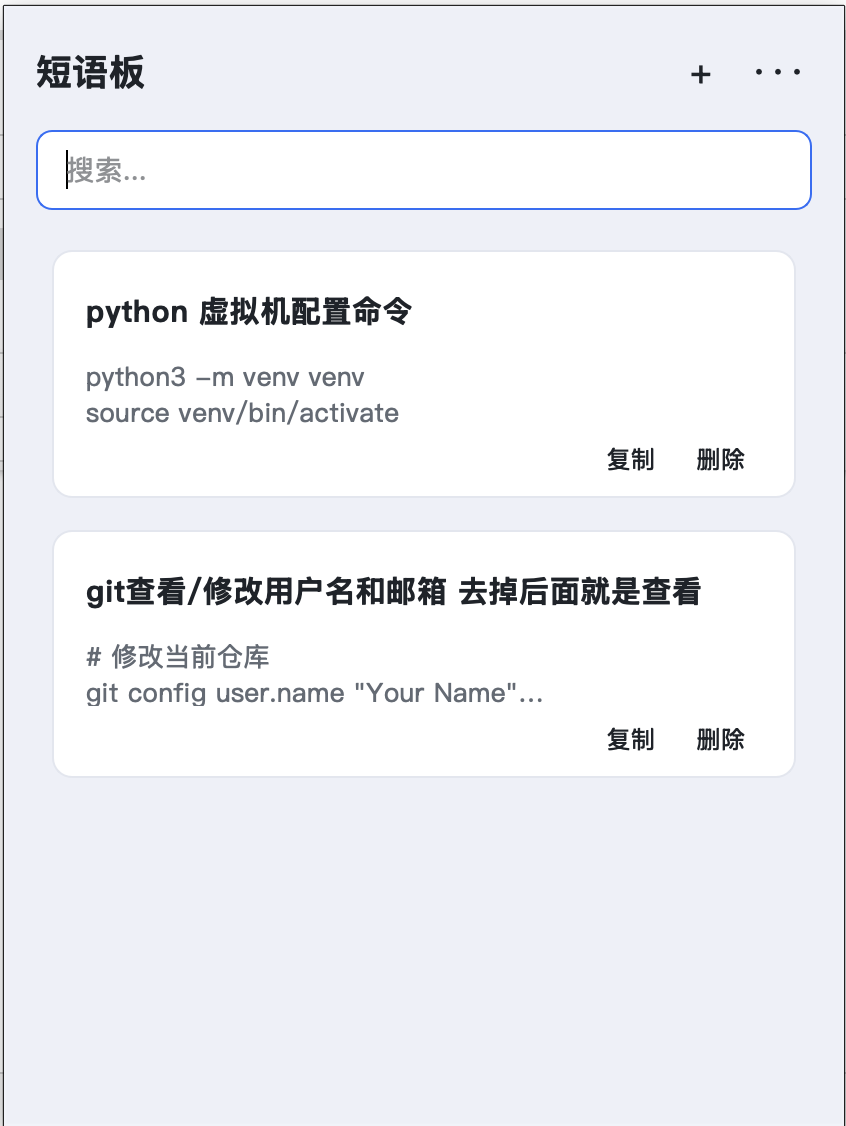
发表评论: